

There was a song by a Chicago band called The Flock that I used to love during my trippy teen days:
Robot, robot arms and legs
Teeth, bones, hair, its all there
Robot, robot arms and legs
Battery’s dead, head’s dead.
(Mechanical man, mechanical man!)
Whenever I muck with my home automation hardware this song plays over and over again in my head. It’s pretty maddening.
Sitting on my dining room table since last Thanksgiving was a small pile of boxes containing Insteon controllers, in-wall dimmers, relays and the like that have been waiting patiently for me to complete the master bedroom renovation. I was intending to do client work over the Fourth but after sixteen consecutive days of building database stored procedures I needed a break! So I assembled my tools and got busy making that pile smaller.
Anyone who has read the X10 primer I posted here knows that I’m a nut for home automation gear. And anyone who has read my blog knows that I’ve been very faithful with renovating and reproducing the original assets in this old house. But you can keep your Chicago Electric rotary and push button switches and your old pull chain fixtures. I want my electrical system state-of-the-art!
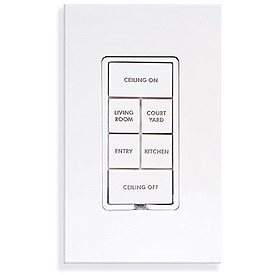 In fact, even my five year-old X10 installation had turned out to be… well… so five years ago. Insteon was the way to go now. I won’t delve into the problems I had with X10. Anyone who’s worked with X10 protocol knows what they are and I harped about them plenty in my X10 primer. Bottom line, I was ready to trade those X10 aggravations for a whole new set of exciting problems.
Fortunately, upgrading an existing X10 installation to Insteon isn’t much more involved than replacing a switch. And of course writing a big check to SmartHome.com, my drug dealer.
While I was removing the old X10 switches and relays I was reminded once again how flimsy and hobby-grade this stuff is. Insteon devices even feel more substantial and professional. The controllers are smaller than their X10 counterparts, which is really nice because X10 devices hog the outlet box and don’t leave much room for wiring. Overall, Insteon is just nicely designed, technically and ergonomically. Insteon switches have a pale lavender backlight displaying the switch status. I’ve never understood the logic behind X10 switches only showing a status light when they’re activated. It’s when you’re stumbling around a dark room that you need a light to find the switch!
 One of Insteon’s biggest strengths however is that you can do all your programming from a seat in front of your computer. With X10 you have to run around the house removing switch plates to change codes, and it’s exponentially worse if you have X10 receivers buried in a ceiling box with a 50-pound fan between you and it.
Here is the brains behind an Insteon household installation: the HouseLinc desktop software.
From here programming a device is just a matter of dragging a controller to a responding device and then clicking “Save all changes to INSTEON network”. Done. Installing a new Insteon device is a bit more involved. You can let the software “spider” your house looking for new devices. But this process can take ten minutes or more and it invariably gets confused over a device or two, disabling them.
Or you can type in the hexadecimal identifier code for the new device, select a device type from the pulldown and force Houselinc to accept it. However, you still need to have Houselinc read the device’s internal link database with “Rediscover device”, which again can leave you with a disabled Insteon device.
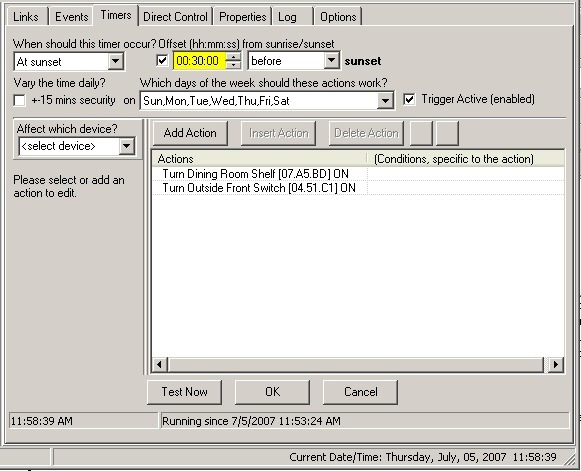 After a couple of hours trying to get the software to recognize the Insteon switch for my kitchen extension sconces, I reloaded the software and it found it. HouseLinc is very much a piece of software-in-progress so there are some rough edges. Fortunately, it automatically downloads updates every time you load it.
You also use the same process to set up your timers, which automatically control selected devices. For instance, I want my outside lights and the “whorehouse lights” in my dining room to go on thirty minutes before sunset. Here it is:
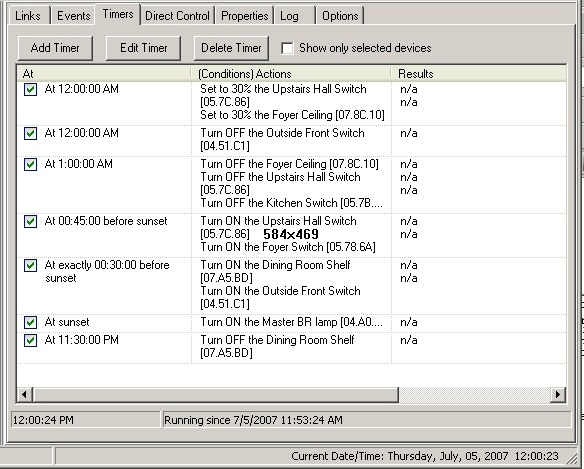 And here’s my timer list. Note that at midnight I want to turn off the outside lights and dim the inside lights to 30% (which is actually brighter than it sounds because they’re CFL bulbs).
All in all, I’m very happy with Insteon. And with Smarthome too.
